
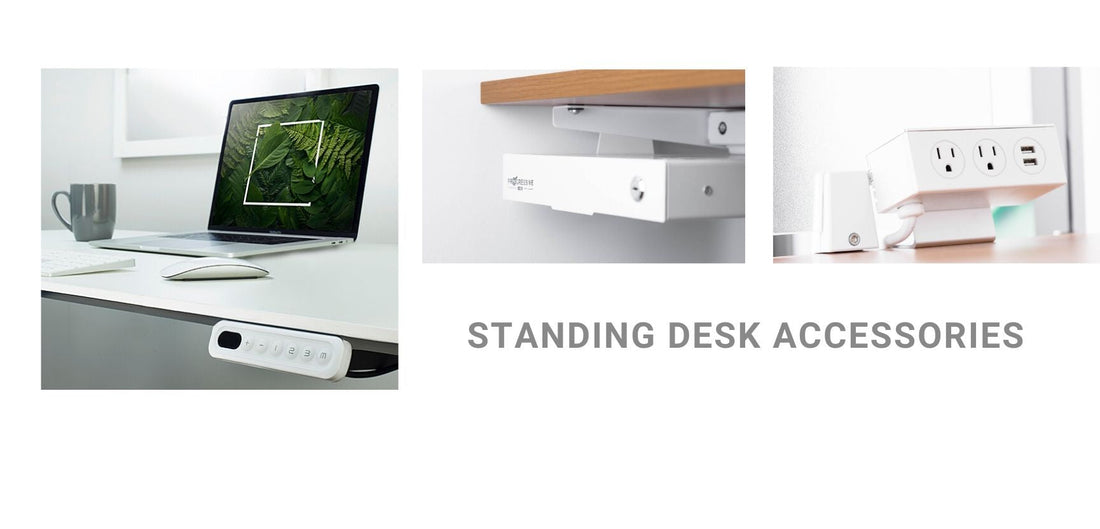
Owning a height-adjustable standing desk is a great start, but the right accessories turn a simple desk into a professional workstation. We have expanded our guide to 13 essential tools that blend productivity with long-term physical well-being. These additions help solve common problems encountered by standing desk users and optimize their daily experience.
Quick Answer: The Key Takeaway
To maximize your desk investment, focus on three categories: Ergonomics (mats, monitor arms), Organization (cable management, drawers), and Connectivity (power hubs, remotes). A complete setup reduces physical fatigue and keeps your mind sharp during long workdays.
Core Benefits of Upgrading Your Setup
Standing desks with the right accessories are investments for your workstation and, most importantly, your health.
- Reduced Physical Strain: Tools like anti-fatigue mats and monitor arms prevent body aches and neck strain.
- Enhanced Organization: Cable management and drawers eliminate clutter, which is a major factor in maintaining focus.
- Seamless Transitions: Advanced remotes and caster wheels allow you to adapt your workspace to your needs in seconds.
Essential Accessories for a Professional Station

1. Anti-Fatigue Mat
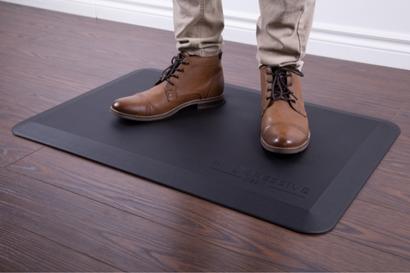
This high-density anti-fatigue mat reduces the strain of standing on hard surfaces. It is ideal for users who stand for more than 2 hours because it encourages micro-movements that improve circulation and prevent leg fatigue.
2. Adjustable Monitor Arms
These monitor arms attach your screen directly to the desk frame to provide 360-degree movement. Aligning your screen at eye level is essential for achieving a perfect ergonomic posture while freeing up valuable desktop space.
3. Cable Management Solutions
Organized cable management tracks and flexible "snakes" house all your power and data cables. This is critical to prevent "cable tug" when raising the desk and to maintain a clean, distraction-free minimalist workspace.
4. Under-Desk CPU Mount
Mounting your computer tower beneath the desk surface using a CPU mount keeps your wires safe and protects your hardware from floor dust. By using a strong steel bracket, the system unit moves up and down with the desk seamlessly.
5. Desk-Clamp Power Strip
A desk-clamp power strip that clips to the edge of your desk puts charging ports for your phone and laptop right where you need them. No more reaching behind the workstation or crawling under the desk to find an open socket.
6. Balance Boards
These dynamic platforms require slight balancing movements to stay centered. They are the perfect update to keep your core engaged and your mind sharp during long meetings by making standing time active rather than static.
7. Ergonomic Office Chairs
High-quality ergonomic chairs provide dedicated support for your back and arms because even with a standing desk, you still need to sit sometimes. Maintaining healthy spinal alignment during sitting intervals is key to a pain-free workday.
8. Under-Desk Drawers
Compact under-desk drawers mount under your surface to keep pens and notebooks organized. Modern models now swivel to ensure they do not interfere with your leg room when you are sitting down.
9. Acoustic Privacy Panels
Privacy panels clip to your desk and are essential for busy offices or shared homes. They block distracting noise and provide a visual boundary that helps you focus better on your tasks.
10. Advanced Remote Controls
Digital remote controls with programmable presets allow you to save your exact "Sit" and "Stand" heights. You can even set timers to remind you when it is time to move throughout the workday.
11. Headphone Hanger
Mounting a low-profile headphone hanger under the desk edge saves surface space and keeps your headset within reach for calls. It also protects your equipment from accidental spills or drops from the desktop.
12. Grommet Power Hubs
Small grommet power hubs fit directly into the holes of your desk to provide a built-in charging hub for your devices. This offers a clean, professional look with no messy wires hanging over the edge of the table.
13. Lockable Caster Wheels
Heavy-duty wheels let you reposition your desk anywhere in your room, making it easy to chase natural light or change your layout throughout the day. They lock securely in place to ensure your workstation stays stable during use.

Common Mistakes to Avoid
- Ignoring Cable Slack: If cables are too short, they can snap when you raise the desk to its full height.
- Improper Monitor Height: Setting your monitor too low leads to neck strain, defeating the purpose of an ergonomic setup.
- Static Standing: Standing still on a hard floor can be just as tiring as sitting; always use a mat to support your joints.
Frequently Asked Questions (FAQ)
Yes, if you plan to stand for more than 2 hours. A reliable anti-fatigue mat encourages the small, constant movements that improve blood circulation and reduce joint pressure, allowing you to stay comfortable and focused for longer.
Most accessories, like remotes, drawers, and power strips, can be purchased individually and added after you have set up your desk. This makes it easy to start with the essentials and build out your setup over time.
Monitor arms offer 360-degree movement and precise height adjustment that a fixed stand cannot match. This flexibility ensures your screen is always at the correct eye level whether you are sitting or standing, reducing neck and eye strain throughout the day.
Most standing desk accessories are designed to be universal. Clamp-on products work with any desktop thickness within a standard range, and under-desk mounts attach to the frame or tabletop with adjustable brackets. If you are unsure, check the product specifications or contact our support team.
An anti-fatigue mat is the most immediate upgrade you can make. Many users underestimate how tiring standing on a hard floor can be, and without a mat, discomfort often leads to abandoning the standing habit altogether. Start there, then build out the rest of your setup gradually.
Conclusion
Building the perfect home office workspace is about more than just standing; it is about creating a seamless flow between movement and focus. At Progressive Desk, we believe your workstation should adapt to you, not the other way around. By choosing the right tools, you are not just buying accessories; you are building a workday that keeps you comfortable, organized, and moving forward.
Take the next step: Browse the full Progressive Desk Accessories Collection to customize your setup and start seeing the benefits of a truly optimized workspace today.
Browse the full Progressive Desk Accessories Collection to customize your setup and start seeing the benefits of a truly optimized workspace today